FastRTK Base Station FAQs
Frequently asked questions about FastRTK base stations, installation, and operation.
General
Where do I purchase a FastRTK base?
Contact Discovery Management Group or your local Eos Arrow vendor for purchase details.
- Phone: (510) 288-9976
- Email: support@gps-mapping.com
In basic terms, what do you need for RTK?
RTK (Real-Time Kinematic) positioning requires three components:
| Component | Purpose |
|---|---|
| Base Station | Known position - provides correction data |
| Rover | Unknown position - where you collect your data |
| Communication | Method to stream corrections in real-time (cellular or UHF radio) |
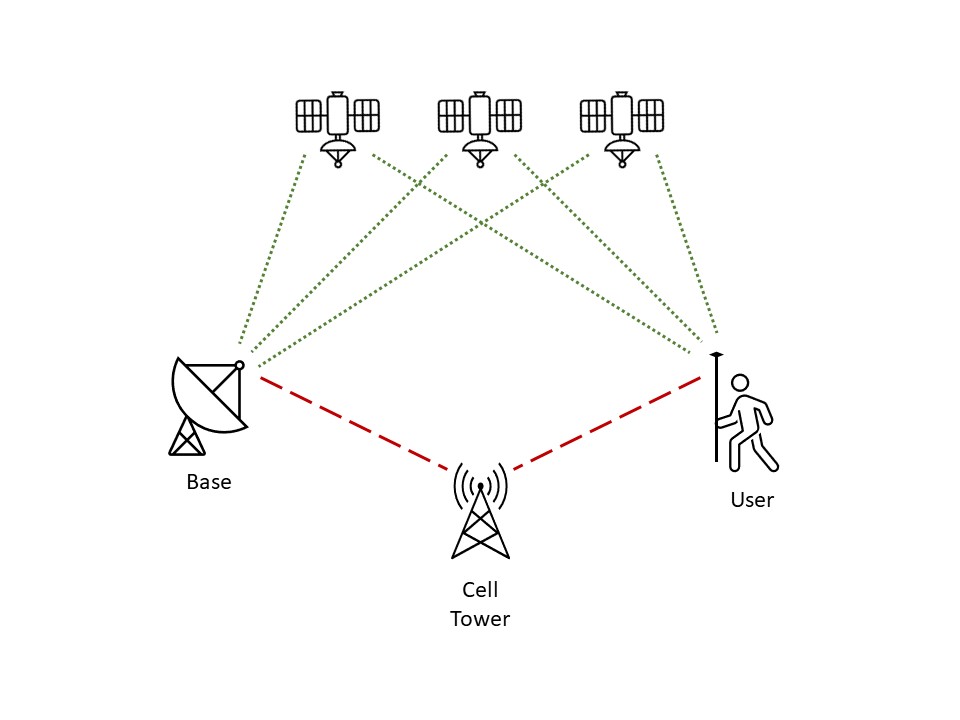
With Cell Coverage
When cellular connectivity is available, corrections stream over the internet via NTRIP protocol:
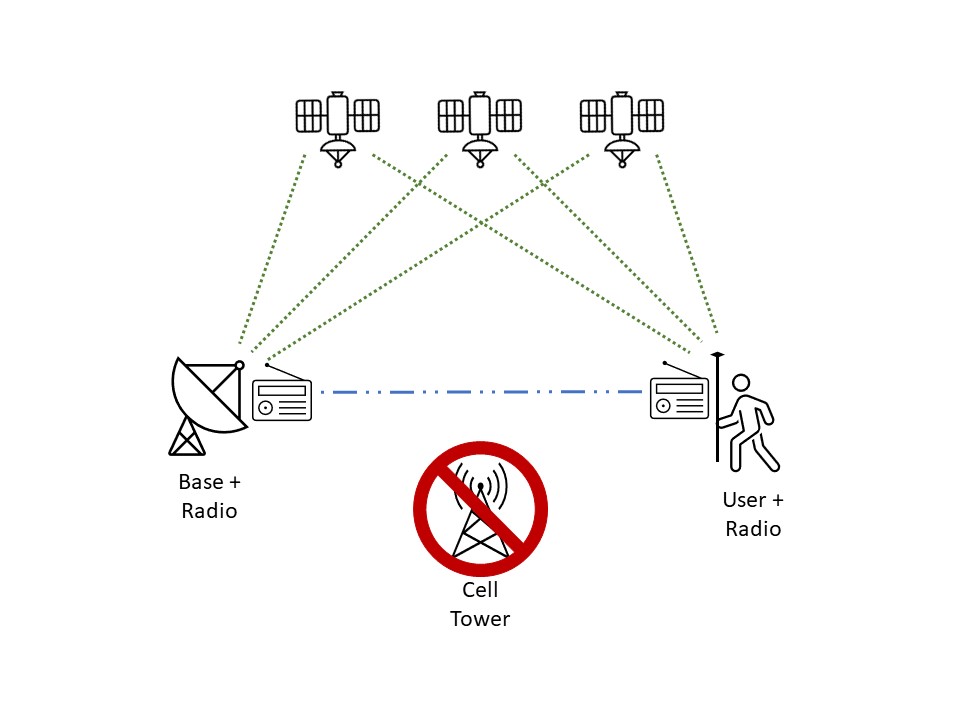
Without Cell Coverage (UHF Radio)
In areas without cellular service, UHF radio provides a direct link between base and rover:
Installation
What are the antenna mounting requirements?
The GNSS antenna must be mounted such that it:
| Requirement | Details |
|---|---|
| Stability | Unable to move, even in heavy winds |
| Sky View | Clear, unobstructed view of the sky in all directions |
| Height | 2 feet or more above any other structures within 25 feet |
| EMI | Clear of any electromagnetic interference |
| Vibration | Clear of harmonic noise or vibration sources (e.g., HVAC systems) |
| Level | Reasonably plumb |
| Orientation | Arrow on the bottom of the antenna oriented north (arrow is located opposite the antenna cable connector) |
[Installation Support]
Need detailed installation guidance? We provide a step-by-step installation guide and support. Contact Discovery Management Group:
- Phone: (541) 829-3443
- Email: ericpg@gps-mapping.com
How does FastRTK software interface with networks?
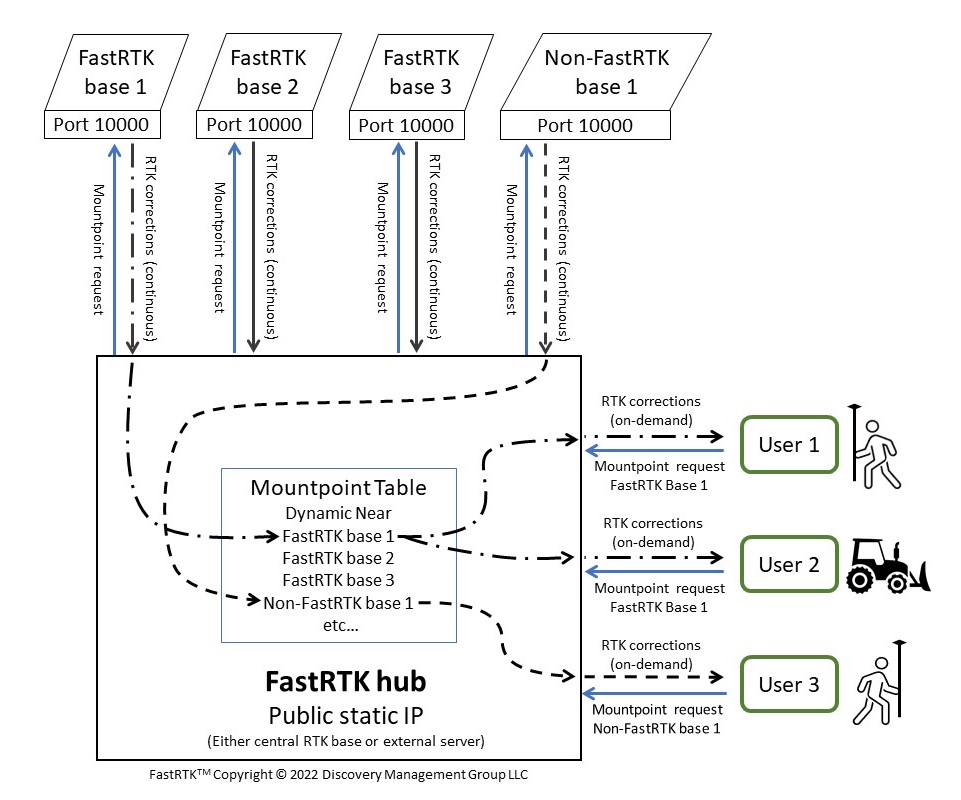
Base Network Architecture
The following diagram shows how the FastRTK base station connects to your network:
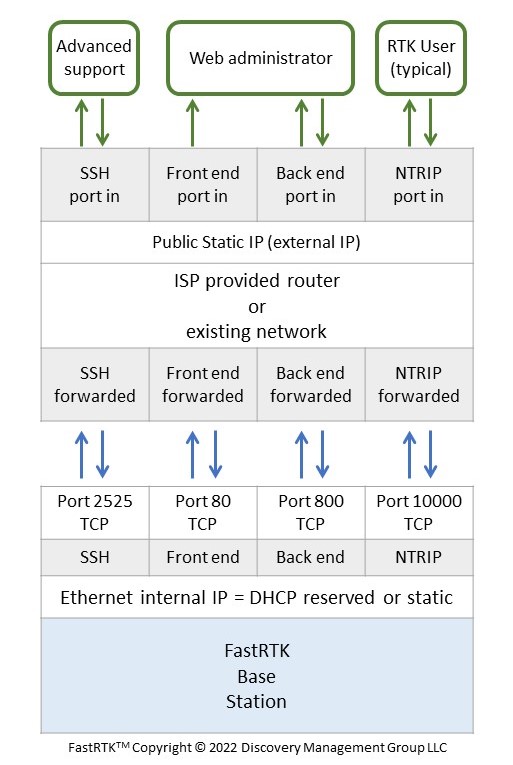
Required Ports - Remote Access Only
If you only need remote access to the base station:
Required Ports - Remote and Local Access
If you need both remote and local access to the base station:
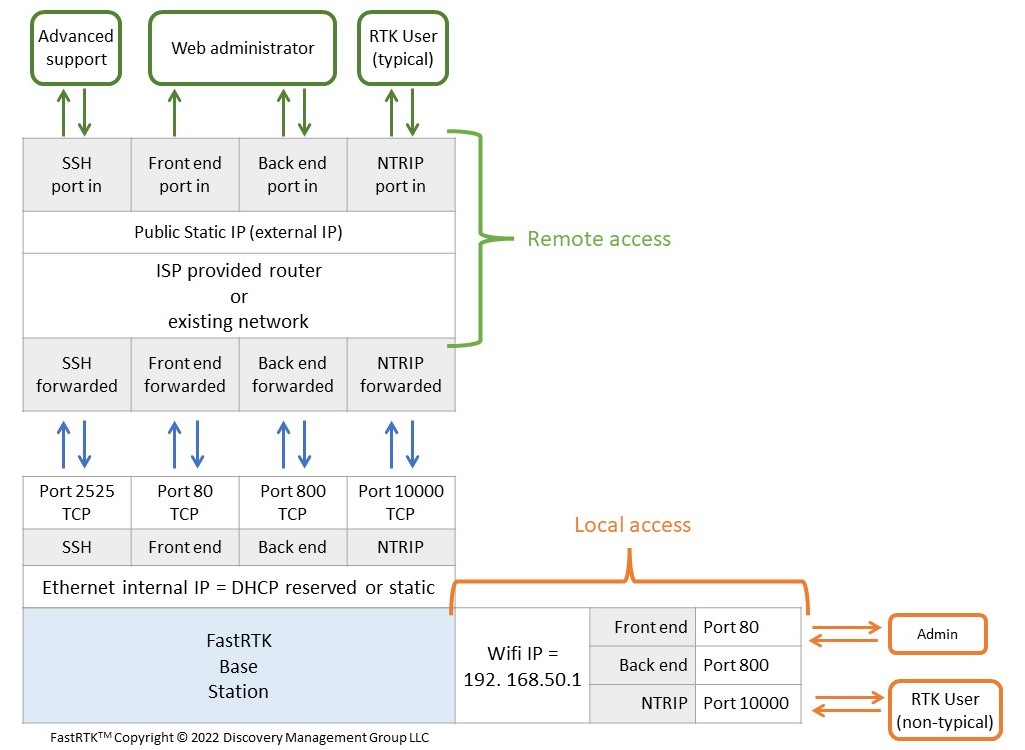
[Port Summary]
For detailed port and firewall configuration, see the IT Security Overview.
Base Hardware
What are the different base components?
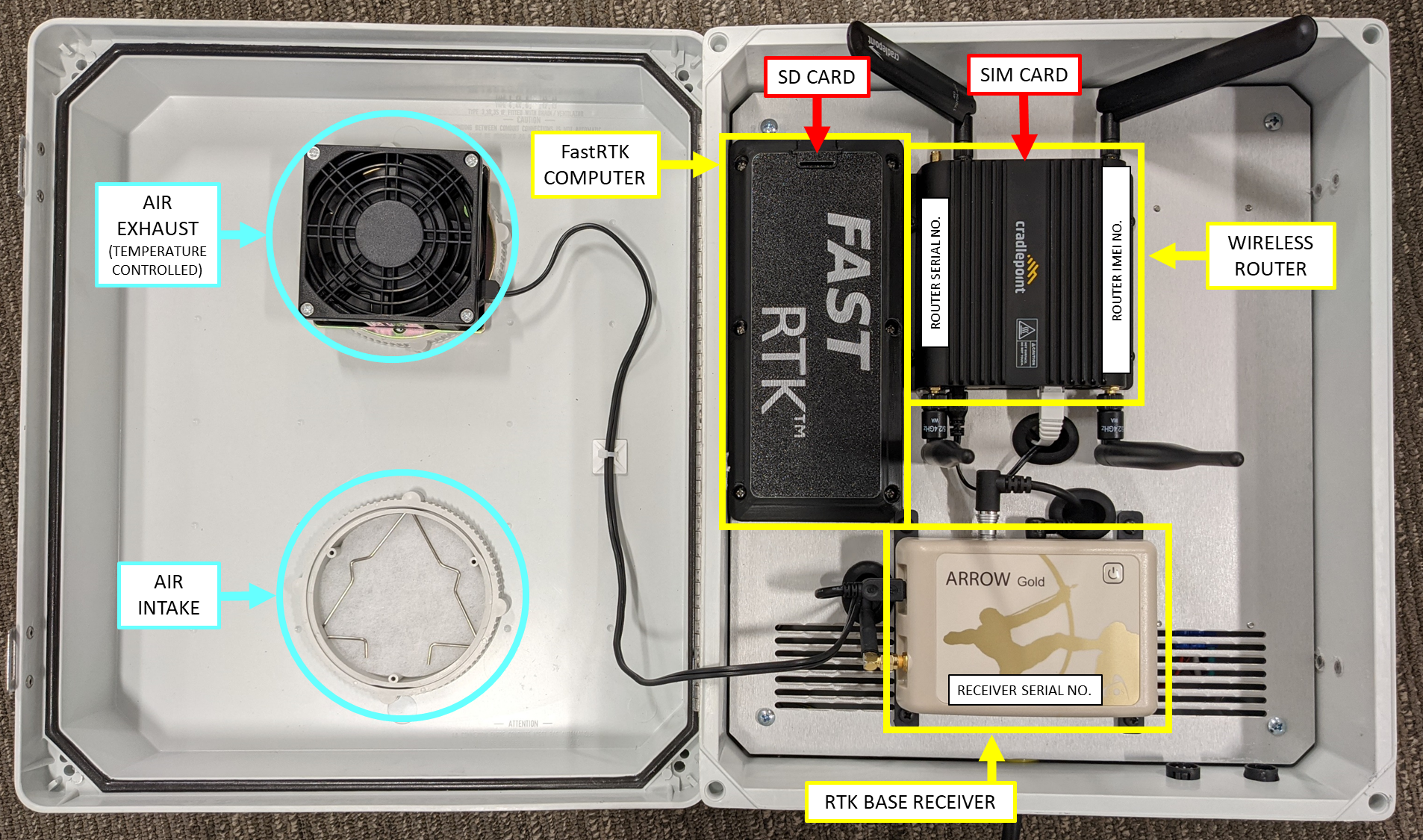
Fixed Base Station (No UHF Radio)
The standard CORS base station for permanent installations with network connectivity:
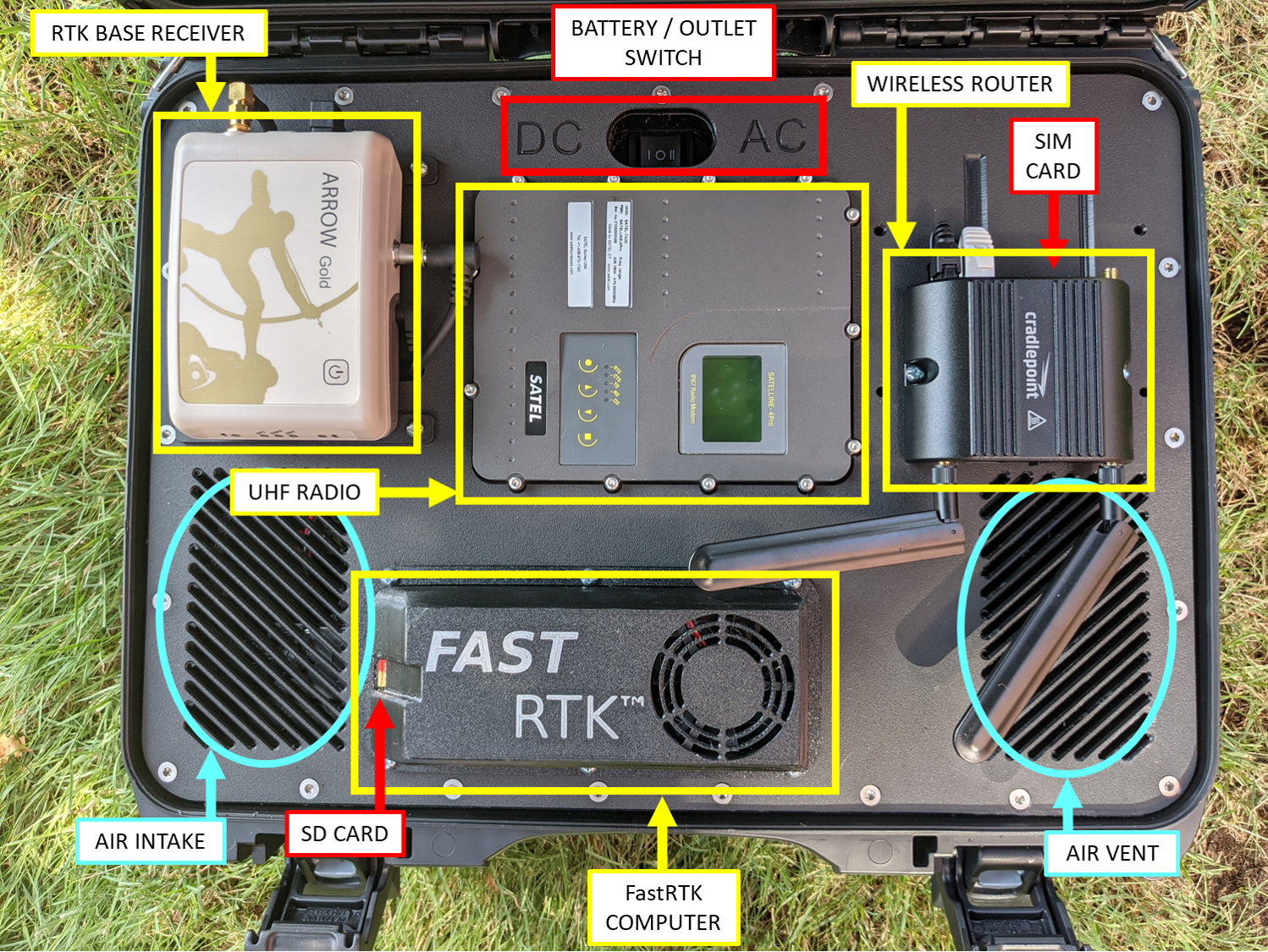
Mobile Base Station (With UHF Radio)
The portable base station with integrated UHF radio for field deployments:
Troubleshooting
Why am I not getting RTK fix?
Common causes and solutions:
| Issue | Solution |
|---|---|
| No corrections received | Check NTRIP credentials and network connectivity |
| Base not transmitting | Verify base coordinates are set |
| Poor satellite coverage | Ensure clear sky view at both base and rover |
| Distance too far | RTK works best within 10-15 km of base |
| Wrong mountpoint | Confirm rover is connected to correct NTRIP mountpoint |
Why is my correction age high?
High correction age (>2 seconds) indicates delayed or interrupted data flow:
| Cause | Solution |
|---|---|
| Network latency | Check internet connection quality |
| Radio interference | Adjust UHF frequency or antenna position |
| Cellular coverage | Move to area with better signal |
| Server overload | Submit a support ticket if issue persists |
Why does my position jump around?
Position instability can be caused by:
- Multipath - Signals reflecting off nearby structures
- Low satellite count - Wait for more satellites or improve sky view
- Float solution - Wait for RTK to converge to fixed solution
- Ionospheric activity - May affect accuracy during solar events
Related Documentation
- Hardware Overview - Compare CORS and mobile solutions
- IT Security Overview - Network ports and firewall configuration
- UHF Radio Setup - Radio configuration and troubleshooting
- Getting Started - Initial setup guide